

 English
 Lietuvių
 Latviešu
 Eesti
Eesti Русский
 Polski
 Українська
 Deutsch
 Italiano
 Español
 Français
 Português
 Čeština
 Magyar
 Română
 Ελληνικά
 Türkçe
 日本語
日本語 العربية
 हिन्दी
 Bahasa Indonesia
 Bahasa Melayu
 ไทย
ไทย Tiếng Việt
 বাংলা
বাংলাWhy Google Is Not Indexing Your Pages and How to Fix It
You published a page, waited a week, searched for it and found nothing. Search Console lists it as “Crawled – currently not indexed” or, worse, does not list it at all. When Google is not indexing your pages, no amount of keyword work or link building will help, because a page that is not in the index cannot rank for anything.
The good news is that indexing problems are usually diagnosable. Every page travels the same path: Google has to discover it, crawl it, render it and decide it is worth keeping. A page that fails drops out at one specific step, and each step has its own typical causes. This guide walks through that path, explains the statuses you will see in Search Console and gives concrete fixes for each one.
How a Page Gets Into Google’s Index
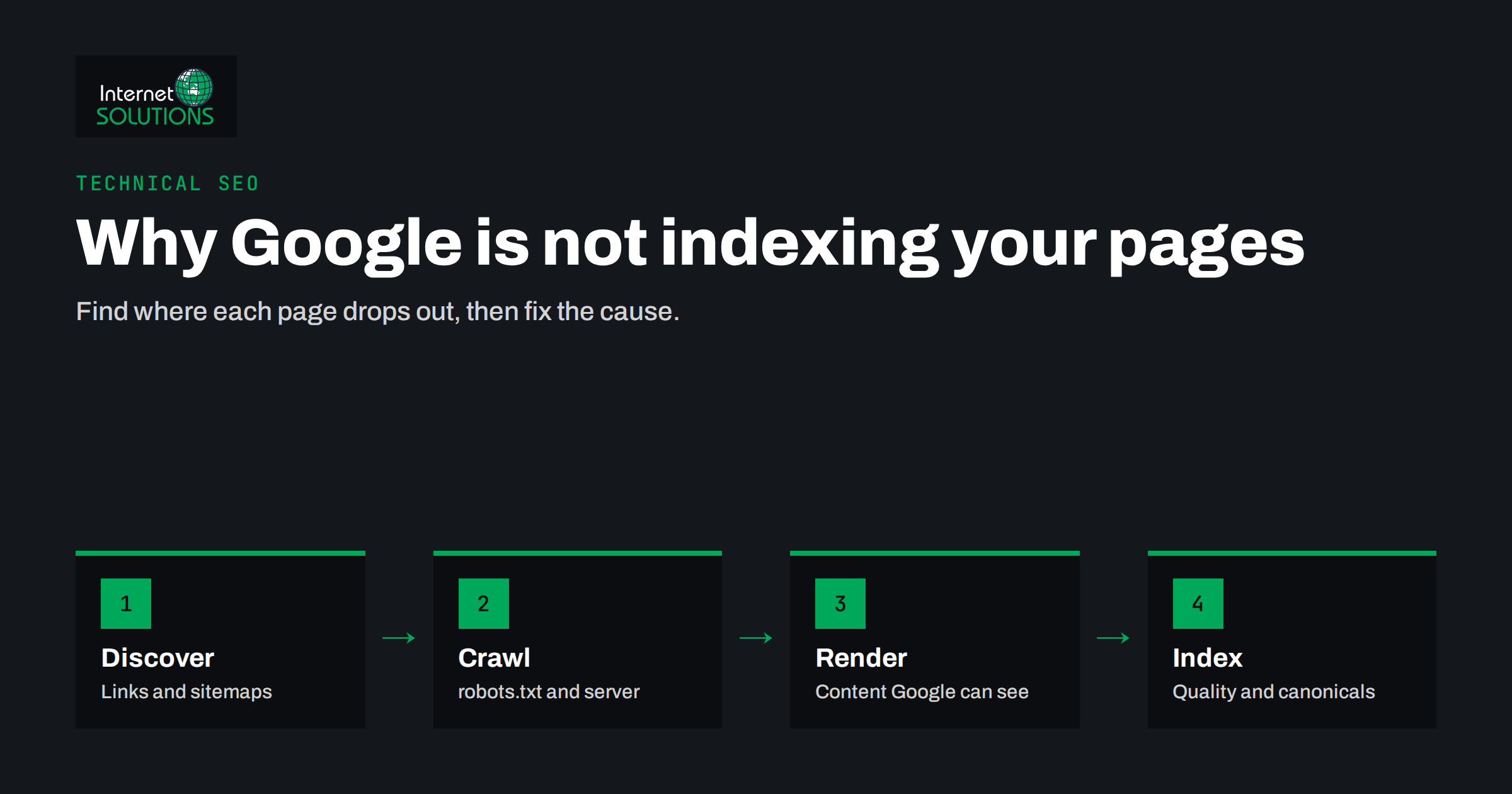
Understanding the pipeline turns a frustrating mystery into a checklist. There are four stages.
- Discovery. Google learns that a URL exists, mainly through links from pages it already knows and through XML sitemaps.
- Crawling. Googlebot requests the URL. It must be allowed by robots.txt and the server must answer successfully and quickly enough.
- Rendering. Google processes the HTML and, where needed, runs JavaScript to see the content a visitor would see.
- Indexing. Google decides whether the page is useful, which version is canonical, and whether to store it. Indexing is selective: Google does not promise to index every page it crawls.
Your job is to find the stage where each page stops. Search Console’s Page indexing report tells you exactly that, if you know how to read it.
Reading the Page Indexing Report
Open Search Console, go to Indexing, then Pages. The chart shows indexed and not indexed pages, and below it a table of reasons why pages are not indexed. Two points prevent a lot of wasted effort.
First, “not indexed” is not automatically bad. Redirected URLs, deliberately noindexed pages, alternate versions with a correct canonical tag and old deleted pages are supposed to be out of the index. A healthy site has plenty of them.
Second, look at which URLs are affected, not only the count. Click a reason to see example URLs. If they are pages you want in search results, that reason is a real problem. If they are tag archives, filter combinations or tracking-parameter duplicates, the report is simply confirming that Google ignores them, which is often what you want.
Use URL Inspection for individual pages
For a single important page, paste its address into the URL Inspection tool at the top of Search Console. It shows whether the URL is on Google, when it was last crawled, which canonical Google selected, whether crawling was allowed and whether the page is mobile-friendly. The live test shows what Googlebot sees right now, which is essential after you fix something.
Common Statuses, Causes and Fixes
The table summarises the reasons you will meet most often, what they usually mean and what to do.
| Status in Search Console | Stage | Usual cause | What to do |
|---|---|---|---|
| Discovered – currently not indexed | Discovery / crawl | Google knows the URL but has not crawled it yet; often weak internal links or an overloaded server | Link to the page from important pages; improve server speed; keep the sitemap clean |
| Crawled – currently not indexed | Indexing | Google saw the page and decided it was not valuable enough, often thin or near-duplicate content | Make the page clearly more useful and distinct, or merge it with a similar page |
| Excluded by ‘noindex’ tag | Indexing | A noindex meta tag or HTTP header, often left from a staging site or set by a plugin | Remove noindex from pages that should rank |
| Blocked by robots.txt | Crawl | A Disallow rule covers the URL | Adjust robots.txt; remember it controls crawling, not indexing |
| Duplicate, Google chose different canonical than user | Indexing | Several URLs show the same content and Google prefers another one | Consolidate duplicates, align canonical tags, internal links and sitemap |
| Soft 404 | Indexing | The page returns 200 but looks empty or like an error page | Add real content or return a proper 404 or 410 |
| Server error (5xx) | Crawl | The server failed when Googlebot requested the page | Check server logs, resources and firewall rules that may block Googlebot |
| Page with redirect | Crawl | The URL redirects elsewhere | Usually fine; update internal links and the sitemap to point to the final URL |
Discovery Problems: Google Cannot Find the Page
If a URL does not appear in Search Console at all, Google probably has not discovered it.
Orphan pages
A page with no internal links pointing to it is an orphan. It may exist in your CMS and even in the sitemap, but without links Google treats it as unimportant and may take a long time to crawl it. Link to new pages from relevant existing articles, category pages and, for key pages, the main navigation. Our guide to internal linking and site architecture explains how to build those paths systematically.
Missing or broken sitemaps
An XML sitemap is not a guarantee of indexing, but it is a strong hint about which URLs you care about. Submit it in Search Console, make sure it lists only canonical URLs that return 200, and check the report for errors. Google’s documentation on sitemaps covers the format and limits.
Links Google cannot follow
Navigation built from JavaScript click handlers instead of real anchor elements with href attributes can hide pages from crawlers. Use normal links for anything you want discovered.
Crawling Problems: Google Cannot Fetch the Page
robots.txt rules
A single line such as Disallow: / left over from development blocks the whole site. Less dramatic rules can block folders that contain important pages or the CSS and JavaScript files needed for rendering. Check robots.txt manually and with the robots.txt report in Search Console. Google’s introduction to robots.txt is clear about one trap: robots.txt stops crawling, not indexing. If you want a page out of search results, allow crawling and use noindex, because Google must crawl the page to see the noindex.
Server errors and slow responses
When the server returns errors or responds slowly, Google reduces how much it crawls. Frequent 5xx errors, timeouts or a security plugin that blocks unfamiliar user agents all lead to pages being crawled rarely or not at all. Look at the Crawl stats report in Search Console and at your server logs. If you see errors, the fix is on the hosting side: resources, caching, database performance or firewall rules. This is the kind of issue our server administration work deals with every week.
Redirect chains and loops
Each redirect adds a step. Long chains waste crawl effort, and loops make pages unreachable. Point redirects directly at the final URL and update internal links so they never rely on redirects.
Rendering Problems: Google Cannot See the Content
Modern sites often build content with JavaScript. Google can render JavaScript, but rendering takes extra resources and anything that fails during rendering is invisible.
- Test with URL Inspection. Use the live test and view the rendered HTML and screenshot. If the main content is missing, Google does not see it.
- Do not block resources. CSS and JavaScript files blocked by robots.txt can break rendering.
- Prefer server-side rendering for key content. Titles, main text and links that arrive in the initial HTML are the most reliable.
- Avoid content behind interactions. Text that only appears after a click, scroll or login may never be rendered for Googlebot.
Indexing Decisions: Google Sees the Page but Skips It
This is the most common and most misunderstood group. Google crawled the page and chose not to index it, or chose another URL instead.
Thin or duplicate content
“Crawled – currently not indexed” usually means Google did not find enough unique value. Short product pages copied from the manufacturer, near-identical location pages and tag archives with one post each are typical examples. Requesting indexing again will not change the decision. Making the page substantially better, or merging several weak pages into one strong page, will.
Canonical confusion
When several URLs show the same content, for example with and without a trailing slash, with tracking parameters or in both HTTP and HTTPS versions, Google picks one as canonical. If your signals disagree, it may pick the wrong one. Make canonical tags, internal links, redirects and the sitemap all point to the same preferred URL. Google’s guide on consolidating duplicate URLs lists the methods and their strength.
Accidental noindex
A surprising number of indexing problems come from a single setting. WordPress has a “Discourage search engines” checkbox that is sometimes left on after launch. SEO plugins can noindex categories, tags or even post types. Staging configurations get copied to production. Check the page source and HTTP headers for noindex on every template type, not only one page.
A Step-by-Step Diagnostic Routine
- Pick one page that should be indexed and inspect it with URL Inspection.
- If Google does not know the URL, fix discovery: internal links and sitemap.
- If crawling is not allowed or fails, check robots.txt, server responses and firewall rules.
- If the rendered HTML lacks the content, fix rendering.
- If the page is crawled but not indexed, compare it honestly with other pages on your site and in the results. Improve, merge or remove it.
- If Google chose a different canonical, align every signal to your preferred URL.
- After fixing, run the live test, then request indexing for that URL. For many URLs, use Validate fix in the report instead.
- Repeat for each template type: articles, products, categories, landing pages. Most indexing issues affect a whole template, not a single page.
If your site has hundreds of affected pages or you are not sure where to start, an independent review of crawling, indexing and content quality is part of our SEO services.
What Not to Do
- Do not request indexing repeatedly. It does not override a quality decision and has a daily limit.
- Do not submit every URL to the sitemap. Parameter URLs, redirects and noindexed pages in the sitemap send mixed signals.
- Do not block a page in robots.txt to remove it from results. Google may keep the URL indexed without content. Use noindex or a 404 instead.
- Do not mass-publish thin pages hoping some will stick. Large numbers of low-value pages can make Google crawl and index the whole site less willingly.
Frequently Asked Questions
How long does it take Google to index a new page?
It varies from hours to several weeks. Pages on established sites with strong internal links are usually indexed faster than pages on new sites or pages that are only listed in a sitemap.
What does “Crawled – currently not indexed” mean?
Google fetched the page but decided not to add it to the index for now, usually because it did not see enough unique value. Improving or consolidating the content is the reliable fix.
Does submitting a sitemap guarantee indexing?
No. A sitemap helps Google discover URLs and understand which ones you consider important, but Google still decides whether each page is worth indexing.
Can robots.txt remove a page from Google?
Not reliably. robots.txt blocks crawling, so Google cannot see a noindex tag on that page. To remove a page, allow crawling and add noindex, or return a 404 or 410 status.
Why is Google indexing a different URL than the one I want?
Google picked another canonical because your signals disagree or the content is duplicated. Make canonical tags, internal links, redirects and the sitemap consistently point to your preferred URL.
Should I worry about all the not indexed pages in Search Console?
Only about pages you want in search results. Redirects, intentional noindex pages and duplicate variants are supposed to be excluded, and seeing them in the report is normal.
The Bottom Line
When Google is not indexing your pages, the cause sits at one of four stages: discovery, crawling, rendering or the indexing decision itself. Use the Page indexing report to see which reason applies, URL Inspection to confirm it on a real page, and fix the whole template rather than a single URL. Most technical causes, such as a stray noindex, a robots.txt rule or server errors, are quick to repair. The harder cases are quality decisions, and there the only lasting fix is fewer, better pages that clearly deserve a place in the index.