

 English
 Lietuvių
 Latviešu
 Eesti
Eesti Русский
 Polski
 Українська
 Deutsch
 Italiano
 Español
 Français
 Português
 Čeština
 Magyar
 Română
 Ελληνικά
 Türkçe
 日本語
日本語 العربية
 हिन्दी
 Bahasa Indonesia
 Bahasa Melayu
 ไทย
ไทย Tiếng Việt
 বাংলা
বাংলাJavaScript SEO: Rendering, Crawling and Indexing JavaScript Websites
JavaScript SEO is the work of making sure search engines can find, render and index the content your scripts produce. A modern website often ships a nearly empty HTML shell and lets JavaScript build the page in the visitor’s browser: menus, product lists, article text, prices, even internal links. People see a finished page. A crawler sees whatever it manages to process, and if that is less than you assumed, pages rank badly or not at all. The cause is rarely a penalty. It is usually a plain technical gap between what you built and what the search engine can read.
This guide explains how search engines process JavaScript, which rendering approach fits which kind of site, the mistakes that most often hide content from crawlers, and how to test a page properly instead of guessing. It is written for business owners and marketers who commission websites and need to ask the right questions, and for developers who want a checklist. If your site is built on a framework and organic traffic is lower than the content deserves, this is a good place to start.
How Search Engines Handle JavaScript Pages
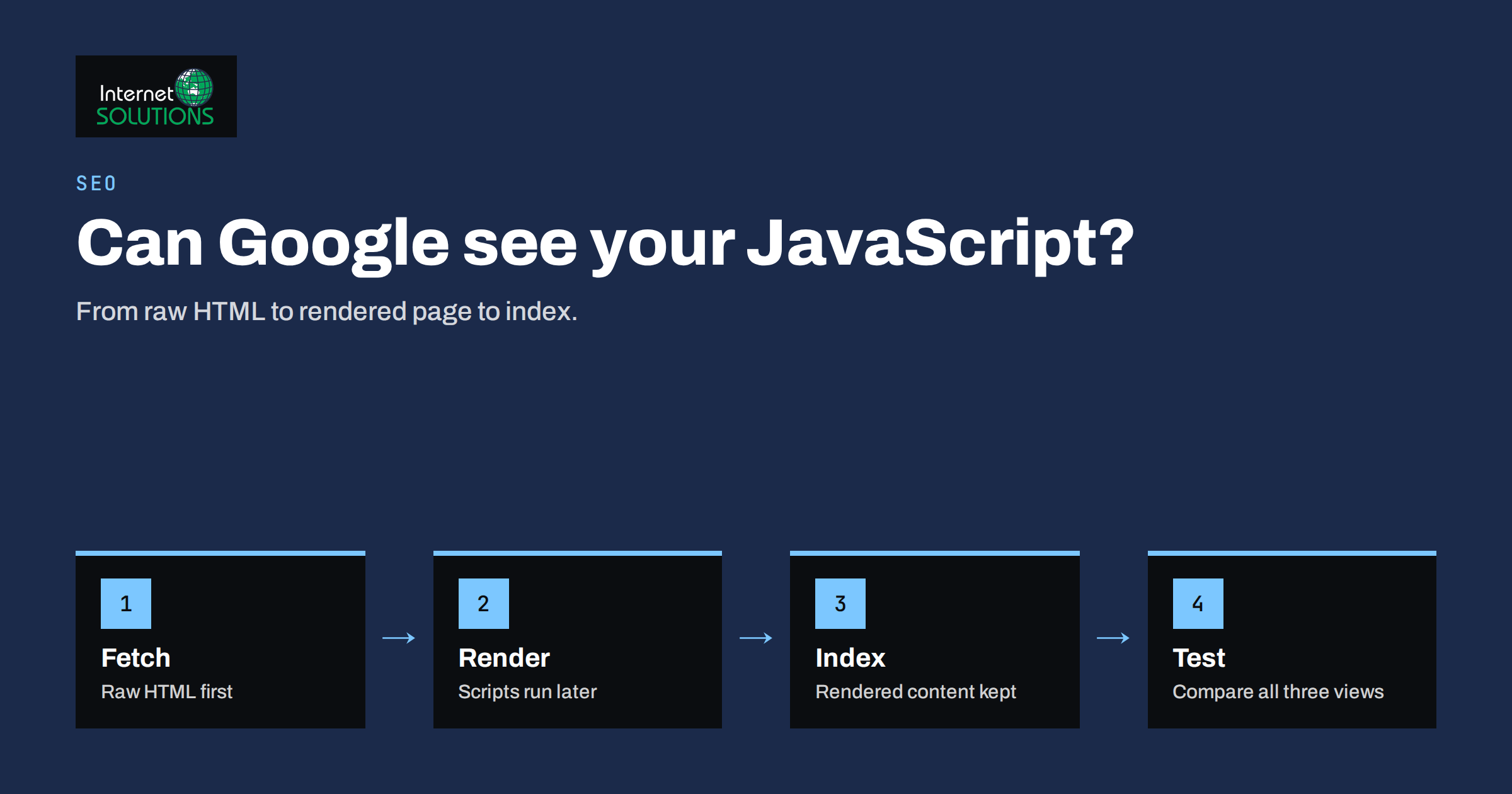
Google’s crawler works in stages. First it fetches the URL and reads the raw HTML that the server returns. It extracts links from that HTML and queues them for crawling. Pages that need JavaScript to show their content are then queued for rendering, where a headless browser executes the scripts and produces the final page. The rendered result is what gets indexed. Google documents this process in its JavaScript SEO basics, and it is worth reading once so you know the vocabulary your developers will use.
Three consequences follow. First, rendering is a second step that can happen later than the first crawl, so content that exists only after scripts run may be indexed more slowly than content in the raw HTML. Second, anything the renderer cannot or will not do is invisible: scripts that fail, resources blocked by robots rules, content that only appears after a click or a scroll. Third, other crawlers behave differently. Some search engines, social media preview bots and AI crawlers read only the raw HTML or run limited rendering, so a page that looks fine in Google can look empty to them.
That last point matters more each year. If your article text, product description or pricing only exists after JavaScript runs, assume that some of the systems that could send you visitors will never see it. The safest design is to deliver the important content in the first HTML response and use JavaScript to enhance it.
Rendering Approaches and What They Mean for SEO
Client-side rendering
The server sends a minimal HTML shell and a script bundle. The browser downloads the scripts, runs them, fetches data from an API and builds the page. It is simple to host and pleasant for logged-in applications, but it is the riskiest option for public pages that need to rank. Content depends entirely on successful rendering, the first HTML contains little for crawlers to use, and slow scripts delay what visitors see.
Server-side rendering
The server builds the full HTML for each request and sends it complete, then scripts take over in the browser. Crawlers and visitors receive real content immediately. The cost is more server work per request and more complexity in the application, but for content that must rank this is the most dependable choice for dynamic sites.
Static generation
Pages are built ahead of time into plain HTML files and served as they are. This is fast, cheap to host and very friendly to crawlers. It suits marketing sites, documentation and blogs where content changes on a schedule rather than on every request. Large catalogues that change constantly can combine it with regeneration of changed pages.
Hydration and islands
Many frameworks send server-rendered HTML and then attach interactivity in the browser. Done well, you get complete content for crawlers and a responsive interface for visitors. Done badly, the page flashes, shifts layout or loads far more script than it needs. Interactive parts such as filters, calculators and chat widgets can be loaded as separate islands so the main content stays light.
Dynamic rendering
Serving a pre-rendered version to bots and the normal version to people used to be a common workaround. Google now describes dynamic rendering as a workaround rather than a recommended long-term solution, because it doubles the number of versions you must keep correct. Treat it as a stopgap while you move to server-side rendering or static generation.
Rendering Options Compared
| Approach | Content in first HTML | Crawler risk | Speed for visitors | Best for |
|---|---|---|---|---|
| Client-side rendering | Almost none | High | Slow first view, fast afterwards | Logged-in applications and dashboards |
| Server-side rendering | Complete | Low | Good, depends on server response time | Large dynamic sites, shops, listings |
| Static generation | Complete | Very low | Very good | Marketing sites, blogs, documentation |
| Hydrated hybrid | Complete | Low | Good if script is kept small | Sites needing both content and interactivity |
| Dynamic rendering | Complete for bots only | Medium, two versions to maintain | Unchanged for visitors | Temporary fix for legacy client-side sites |
The Mistakes That Hide Content From Search Engines
Links that are not links
Crawlers follow anchor elements with a real address in the href attribute. Navigation built from buttons, spans or click handlers that change the page without a URL gives a crawler nothing to follow. Product listings that load the next page on a button press, with no link to a paginated URL, leave everything beyond the first screen undiscoverable. Use proper links for anything that represents a page, and let JavaScript intercept the click for a smoother experience.
Fragment URLs and missing page addresses
Single-page applications that change content without changing the address, or that use a hash fragment as the route, present one URL to the world. Each distinct page of content needs its own clean, indexable address, created with the browser’s history interface rather than a fragment. Our guide to internal linking and site architecture explains why every important page should be reachable through plain links.
Blocked scripts and resources
If the robots rules block the folders holding your scripts, styles or API responses, the renderer cannot build the page and indexes an empty or broken version. Check that nothing the page needs to display its content is disallowed. The robots.txt and sitemap guide covers how to do this safely.
Content that waits for interaction
Text loaded only after a click, a scroll event or a timer may never appear for a renderer, which does not click or scroll the way a visitor does. Tabs and accordions are fine when the text is in the page and merely hidden; they are a problem when the text is fetched only when opened. Lazy loading of images is fine with the right markup, but lazy loading of the main text is not.
Titles, descriptions and canonical tags set late
Metadata injected by scripts can be missed or applied inconsistently. If the title, meta description, canonical tag or robots directive in the raw HTML differs from the one after rendering, search engines may use either. Worse, a template that outputs a noindex tag in the raw HTML and removes it with JavaScript tells Google not to index the page before it ever runs your script. Put critical directives in the first HTML response and keep them identical after rendering.
Soft errors and wrong status codes
A client-side application that shows “page not found” text but returns a normal success status teaches search engines that thousands of nonexistent URLs are real pages. Return a genuine 404 or 410 status from the server for missing content, and a proper redirect for moved content. Our article on 301 redirects covers the redirect side.
Heavy scripts and slow rendering
Renderers have limited time and resources. A bundle that takes many seconds to execute, or that waits on a slow API, can leave the rendered page incomplete at the moment it is captured. Large bundles also hurt real visitors, and the Core Web Vitals measurements that influence rankings. Splitting code, deferring non-essential scripts and caching API responses help both audiences.
How to Test a JavaScript Page Properly
Do not trust what the page looks like in your browser. Compare three views of the same URL and look at the differences.
- The raw HTML. Fetch the page with a plain command-line request, or use the “view source” option rather than the element inspector. This is what a crawler that does not render sees. Check that the main heading, body text, internal links, title, description and canonical tag are all present.
- The rendered HTML. In Google Search Console, the URL Inspection tool shows the rendered HTML and a screenshot from Google’s own renderer, plus any resources that failed to load. Compare it to the raw version. Everything important that appears only in the rendered view depends on the render step succeeding.
- The indexed result. Search for a distinctive sentence from the page in quotation marks, restricted to your site. If the page is indexed but the sentence is not found, the content was probably not rendered when Google last looked.
Our guide to Google Search Console shows how to use the inspection and coverage reports together. Repeat the comparison on a handful of templates rather than every URL: one article, one category page, one product page, the home page and one filtered listing usually reveal the pattern.
A Practical Fix Order
When a JavaScript site underperforms, fix in this order, because each step makes the next one more reliable.
- Make every indexable page reachable through real links with clean addresses and no fragments.
- Return correct status codes, especially for missing pages, moved pages and server errors.
- Put the main content and the key metadata in the first HTML response, using server-side rendering or static generation for templates that need to rank.
- Unblock the resources the renderer needs and remove anything that depends on user interaction to show primary text.
- Reduce script weight and delay so rendering finishes quickly for both crawlers and visitors.
- Add structured data in the HTML so it does not rely on late scripts; see our overview of structured data for business websites.
Frameworks, Plugins and Page Builders
Most business websites do not need a custom JavaScript application at all. A conventional server-rendered site, such as a well-built WordPress installation, delivers complete HTML by default, and the occasional interactive widget does not change that. Problems appear when a site is built as a single-page application for reasons of fashion rather than need, or when a page builder or theme loads large parts of the page through scripts. Before agreeing to a client-side framework for a brochure or blog site, ask what the application does that a normal page cannot, and ask how the pages will be delivered to search engines.
If you already have a client-side site, the pragmatic path is rarely a full rewrite. Start by moving the templates that matter most for organic traffic, usually articles, categories and product pages, to server-side rendering or static output, and leave account areas and tools as they are. Our website development team approaches such projects in stages so rankings are protected during the change, in line with the advice in our guide to migrating a website without losing SEO rankings.
Monitoring After the Fix
Rendering problems return quietly: a new release changes how links are built, a script bundle grows, a deployment blocks a folder. Build a small recurring check. Once a month, run the three-view comparison on your sample templates, review the indexing report for sudden changes, and look at crawl statistics for spikes in errors. After any redesign or framework upgrade, repeat the checks before and after launch. A monthly technical review is part of what we include when we run a structured SEO analysis, because these regressions cost far more to find after traffic has dropped than before.
Frequently Asked Questions
Can Google index content that is loaded by JavaScript?
Yes, Google renders JavaScript and can index the result, but rendering happens as a second step and can be delayed or fail. Content in the first HTML response is indexed more quickly and more reliably, and other crawlers may not render at all.
Is client-side rendering bad for SEO?
It is the riskiest approach for public pages that must rank, because all content depends on successful rendering. It is fine for logged-in applications. For marketing pages, articles and products, server-side rendering or static generation is safer.
What is the quickest way to see what Google sees?
Use the URL Inspection tool in Google Search Console and view the rendered HTML and screenshot, then compare it with the raw page source. Differences show which content depends on rendering.
Do I need dynamic rendering?
Probably not. Google describes it as a workaround rather than a long-term solution. Use it only as a temporary measure on a legacy site while you move to server-side rendering or static generation.
Does lazy loading hurt SEO?
Lazy loading images with standard attributes is fine and helps speed. Lazy loading the main text, or loading content only after a click or scroll event, can hide it from crawlers, so keep primary content in the page by default.
Should every page on a JavaScript site have its own URL?
Yes. Each distinct piece of content you want indexed needs its own clean address, reachable through ordinary links and returning the right status code, not a hash fragment or a state that changes without a URL.
The Bottom Line
JavaScript SEO comes down to one question: when a crawler asks for a page, does it receive the content and the signals that page is meant to rank for? Deliver the main content, links and metadata in the first HTML response, give every page a real address and status code, keep scripts light, and test with raw, rendered and indexed views instead of assumptions. Choose rendering by the job each template does, using server-side rendering or static output for pages that must be found and client-side code for tools behind a login. Sites built that way are faster for visitors, easier for every kind of crawler and far less likely to lose traffic after a release.