

 English
 Lietuvių
 Latviešu
 Eesti
Eesti Русский
 Polski
 Українська
 Deutsch
 Italiano
 Español
 Français
 Português
 Čeština
 Magyar
 Română
 Ελληνικά
 Türkçe
 日本語
日本語 العربية
 हिन्दी
 Bahasa Indonesia
 Bahasa Melayu
 ไทย
ไทย Tiếng Việt
 বাংলা
বাংলাEmail Blacklists: How to Check, Get Delisted and Stay Off Them
Email blacklists are lists of IP addresses and domains that receiving mail systems treat with suspicion. When your sending address ends up on one, the symptoms are confusing: invoices that customers swear they never received, replies that stop arriving, bounce messages with unfamiliar codes and newsletters that suddenly reach far fewer inboxes. Because the mail often appears to leave your system normally, many businesses lose days or weeks before anyone connects the problem to a listing.
This guide explains what email blacklists are, how to check whether you are listed, the common reasons it happens, how to get removed properly and how to prevent a repeat. It is written for business owners and the people who look after their mail, not for mail-server specialists, but it includes enough technical detail to guide a conversation with your hosting or IT provider. Website blacklisting, where search engines or browsers flag a compromised site, is a separate topic covered in our article on website malware and blacklisting.
What an Email Blacklist Is
A blacklist, also called a blocklist or a reputation list, is a database of sending IP addresses, domain names or sometimes URLs that have been associated with spam, abuse or suspicious behaviour. Receiving mail systems consult one or more of these lists when a message arrives. Depending on the list and the receiver’s policy, a listing can lead to outright rejection, delivery to the spam folder or extra scrutiny.
Not all lists are equal. Some are run by well-known anti-abuse organisations and are widely used. Others are small, aggressive or poorly maintained, and few large receivers consult them. Some lists cover only addresses that should never send mail directly, such as ranges used by home connections. Others record actual spam activity. Understanding which list you are on matters more than the fact that you are on a list at all.
It also helps to separate blacklists from the broader idea of sender reputation. Large mailbox providers keep their own internal reputation scores for domains and addresses, based on complaints, bounces, engagement and authentication. These internal scores are not public lists, yet they influence delivery far more than most public blacklists. A clean result on public lists therefore does not guarantee good inbox placement.
Signs That You May Be Listed
- Bounce messages that mention a block or a reputation list. The wording often includes the name of the list or a link to a removal page.
- Delivery failures to a specific provider only. If messages to one large provider bounce while others arrive, the cause may be that provider’s own policy.
- A sudden drop in opens or replies. Not proof by itself, but worth investigating, especially if it happens on a single day.
- Customers reporting missing messages. Transactional email such as receipts and password resets is the first thing people notice.
- A large queue of deferred messages on your mail server.
- Warnings from your hosting provider about outbound spam or a compromised account.
Read bounce messages carefully. They are the most direct evidence you have. A temporary deferral and a permanent rejection mean different things, and the text usually says why.
How to Check Whether You Are Listed
Work through these steps in order:
- Identify the sending address. Look at the headers of a bounced or delivered test message to find the IP address that actually sent it. For a newsletter tool or hosted service, that is the provider’s address, not your own server.
- Identify the sending domain. Note the domain in the visible From address and the domain in the technical return path. Both can be checked.
- Query reputation lookup tools. Several free services check an address or domain against many lists at once. Use more than one, and note exactly which lists report a problem.
- Check the lists that matter most. Organisations such as Spamhaus publish information about their listings and removal processes. A listing on a widely used list is more serious than one on an obscure one.
- Check receiving providers’ postmaster tools. Large providers offer free dashboards showing reputation, spam rates and authentication results for domains you send from. Setting these up is valuable even when nothing is wrong.
- Send test messages to addresses at several major providers and see where they land.
Record what you find, with dates and list names. You will need it if you contact a list operator or your provider.
Common Reasons for Being Listed
| Cause | How it happens | Typical fix |
|---|---|---|
| Compromised account or website | Stolen passwords or a hacked contact form send spam from your server | Close the hole, change credentials, clean up, then request removal |
| Infected computer on your network | Malware sends mail directly from an office connection | Clean the device, block outbound mail from workstations |
| Poor list quality | Mailing to old or purchased addresses brings bounces and spam traps | Clean the list, confirm consent, slow down |
| High complaint rate | Recipients mark mail as spam | Make unsubscribing easy, send only what people expect |
| Missing authentication | No SPF, DKIM or DMARC, so mail looks forged | Set up and test authentication |
| Shared address with a bad neighbour | Another customer of your provider abuses the same IP | Ask the provider to move you or clean the range |
| Open relay or misconfigured server | The server accepts mail from anyone and forwards it | Fix the configuration and restrict relaying |
| Sudden volume spike from a new address | No history, then thousands of messages at once | Warm up gradually |
| Dynamic or residential address | Sending directly from a connection that should use a relay | Use an authenticated relay or a proper mail service |
Get Delisted: The Right Order of Work
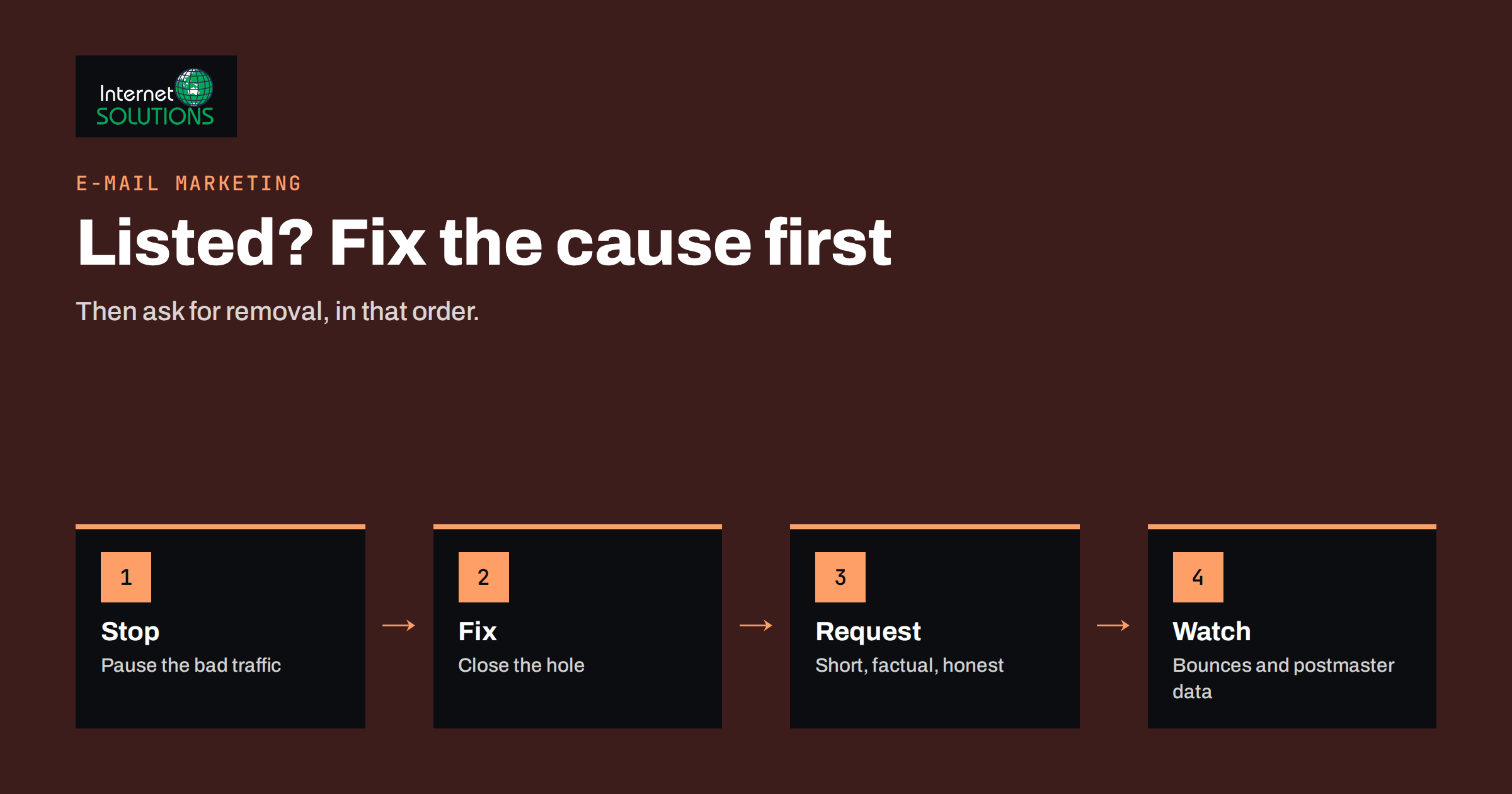
The most common mistake is to request removal immediately. Most reputable lists will remove an address quickly, but if the underlying problem remains, you will be listed again, often with a harsher penalty. Follow this order:
- Stop the bad traffic. Pause bulk sending and, if needed, suspend the compromised account. Check the mail queue for unusual messages and look at logs to find out how they were sent.
- Find and fix the cause. Reset passwords, enable multi-factor authentication, update the website and plugins, remove malware, close open relays, fix forms that can be abused. Our article on SPF, DKIM and DMARC covers the authentication side.
- Verify the fix. Send test messages, watch the queue and confirm that nothing unexpected is leaving.
- Read the list’s removal policy. Each list publishes its own rules. Some remove entries automatically after a quiet period. Others require a request with an explanation. A few charge for faster removal, which is a reason to be cautious.
- Submit a clear request. State what happened, what you changed and how you will prevent a recurrence. Short, factual and honest requests work best.
- Wait and monitor. Removal can take hours or days. Keep checking, and keep the sending volume low until the status is clear.
- Repeat for each list. Each operator makes its own decision.
If you send through a hosting provider or an email marketing service, contact their support early. They often have relationships with the major lists and can see details you cannot, such as whether other customers on the same address are involved. If the listing is of a shared address you do not control, the correct step is to ask the provider to resolve it or move you.
What Not to Do
- Do not pay for suspicious “removal services”. Legitimate removal is normally free, and paid shortcuts do not fix the cause.
- Do not rotate addresses to dodge a listing. Changing your sending address without fixing the cause spreads the problem and damages your domain’s history.
- Do not keep sending at full speed. Continuing to mail while listed can make things worse.
- Do not ignore bounces. They contain the evidence you need.
- Do not assume the listing is the only issue. Poor authentication or list quality often sits behind it.
Preventing Blacklisting
Prevention is mostly good sending hygiene, and the same habits improve delivery generally.
- Authenticate your mail. Publish SPF, set up DKIM signing and start with a monitoring policy for DMARC, tightening it as you gain confidence.
- Send only to people who asked. Use confirmed or clearly documented consent, and honour unsubscribes immediately. See our summary of email marketing compliance.
- Clean your list regularly. Remove hard bounces at once, suppress inactive contacts and avoid old addresses. Our guide to email list hygiene lists the routine.
- Warm up new sending addresses. Increase volume gradually, as described in our piece on email warm-up.
- Separate streams. Keep transactional mail, such as receipts and password resets, away from bulk marketing where possible, so a marketing problem does not block critical messages.
- Secure accounts and forms. Use strong passwords with multi-factor authentication, protect contact forms from abuse and keep websites updated.
- Restrict outbound mail from workstations. Office computers should send through the approved mail service, not directly to the internet.
- Monitor. Use postmaster dashboards, review bounce reports and set up alerts for sudden changes in volume or rejection.
Industry groups such as the Messaging, Malware and Mobile Anti-Abuse Working Group publish best-practice material for senders, and large providers publish their sender requirements; Google’s email sender guidelines are a good example to read and apply.
A Simple Monitoring Routine
- Weekly: look at bounce reports and complaint rates, and send a test message to a few major providers.
- Monthly: check public reputation lookups for your sending addresses and domains, and review postmaster dashboards.
- After any change: new mail service, new domain, new form or website migration, send tests and confirm authentication passes.
- When anything looks odd: check immediately instead of waiting for customers to complain.
Keep a short document listing every system that sends mail for your domain: the office mail service, the website, the invoicing tool, the newsletter platform and the support desk. Unknown senders are a common cause of authentication failures and of mysterious listings.
If a listing keeps coming back or you are unsure about the cause, ask for help early. Our e-marketing team can review your authentication, list practices and sending setup.
Frequently Asked Questions
How do I know if my email address is blacklisted?
Check bounce messages for the name of a list, then test your sending IP address and domain with reputation lookup tools and the postmaster dashboards of large mailbox providers. Compare the results rather than relying on a single tool.
Is being on a blacklist the same as going to spam?
Not exactly. Some listings cause outright rejection, while spam-folder placement often results from a provider’s own reputation scoring, which is not public. You can have inbox problems without appearing on any public list.
How long does it take to be removed?
It varies by list. Some remove entries automatically after a quiet period, others after a request. It can take hours or several days. If the cause is not fixed, you may be listed again.
Can a shared hosting or newsletter provider cause my listing?
Yes. If you send from an address shared with other customers, their behaviour can affect you. Contact the provider, show the evidence and ask them to resolve it or move you to a cleaner address.
Do SPF, DKIM and DMARC prevent blacklisting?
They do not prevent it by themselves, but they help receivers verify that mail is genuinely yours, protect against forgery of your domain and make your reputation easier to build.
Should I change my sending domain if I am listed?
Usually not as a first step. Fix the cause and request removal first. Switching domains without fixing the problem simply moves it, and a new domain has no reputation until you build one.
The Bottom Line
Email blacklists are a symptom, not the disease. When one appears, stop the traffic that caused it, find and fix the root cause, request removal in a clear and honest way and then monitor. Prevent repeats with authenticated mail, consent-based lists, regular cleaning, gradual warm-up, secured accounts and separate streams for important messages. A short monthly routine will catch most problems before customers notice them. If you need a hand investigating a listing or tightening your mail setup, you can reach our team through the contact page.